Small, useful tools for Second Life.
From the Greek agalma — a thing of delight, given freely.

Small, useful tools for Second Life.
From the Greek agalma — a thing of delight, given freely.
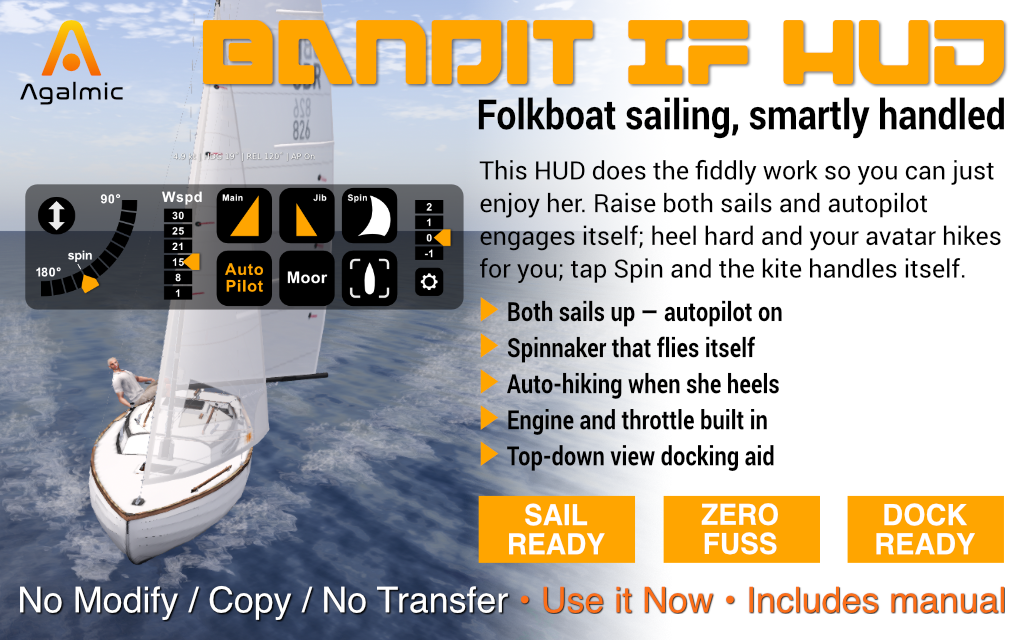
Folkboat sailing, smartly handled.
Everything the IF HUD does, how to rig your boat for it, and a worked first sail from mooring to mooring. Jump to a section:
The Bandit International Folkboat is a small, forgiving keelboat — the boat you reach for when you just want to be on the water, not wrestling with it. The IF HUD keeps that spirit. It looks after the fiddly parts of sailing — tracking the wind, trimming to it, hiking out when she heels, flying the spinnaker — so the boat feels as easy to sail as her designers intended.
Wear the HUD, drop one small script into your boat, and raise both sails. A few seconds later the autopilot takes over the trim and the wind settles at a comfortable broad reach. Steer wherever you like; the sails stay full. The HUD also carries a built-in engine throttle for harbour work, so a single panel takes you from mooring to open water and back again.
The IF HUD does not modify your boat. The only thing it adds is a small broadcast script you drop in during rigging; remove that script and your Bandit IF is exactly as it came.
Most Second Life wind systems set the wind in world terms — "from the south-west at fifteen knots". The moment you turn, the wind shifts against your new heading and the sails need re-trimming. Get it wrong and the boat stalls.
The IF HUD works the other way round. You set the wind angle relative to your bow — a broad reach off the quarter, say — and the HUD holds it locked there as you steer. Whatever direction you point, the sails stay full. You go where you steer, and the trim looks after itself.
Set the angle once. Turn as much as you like. The wind turns with you, so the sails stay drawing on every heading.
Hover or tap a marker to see what each control does, then read the full reference below. Controls run left to right; tap once unless noted.
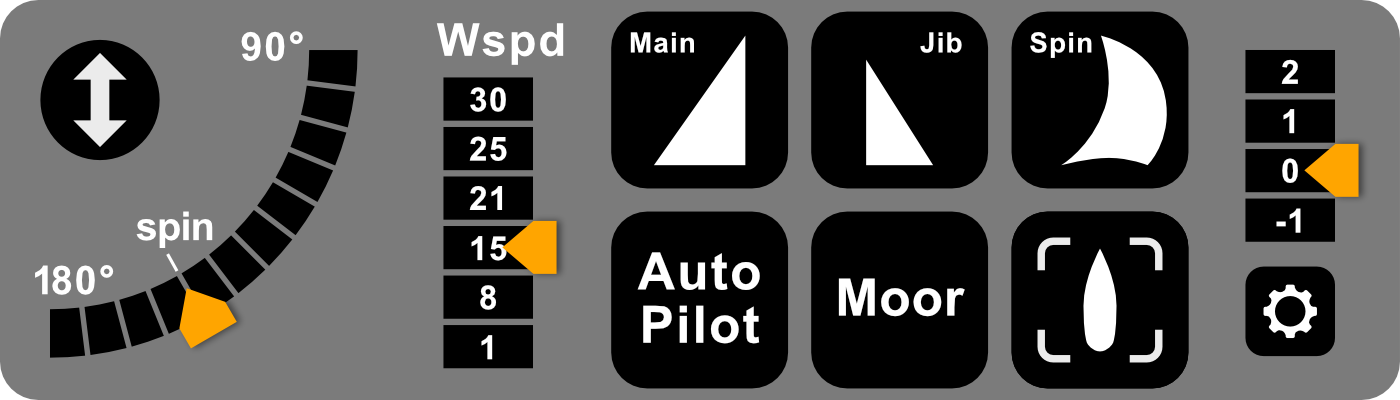
The IF HUD panel. Marker positions are a guide — the labels on the HUD itself are the reference.
The double-arrow button slides the whole HUD off the bottom of the screen, and brings it back with another tap. Tuck it away when you want an uncluttered view; bring it back the moment you need the controls.
Tap anywhere along the arc to set the wind angle relative to your bow; the orange tab jumps to where you tapped and marks the angle you are holding. For a finer setting, touch the tab and slide it along the arc — it follows your cursor to the nearest degree. The arc runs from 90° (a beam reach, wind across the boat) round to 180° (dead downwind). Tap higher up the arc to sail closer to the wind — the boat picks up and feels livelier; tap lower for a broader, gentler angle. The small spin mark shows the deep band where the spinnaker is happy.
Sets the wind strength in knots: 1, 8, 15, 21, 25 or 30. Tap a value and the orange tab jumps to it. 1 is a near-calm drift, 15 a comfortable working breeze, 30 a proper blow. Raising the spinnaker snaps this to its top setting on its own.
Raises or lowers the mainsail. Raise the Main and the Jib together to bring the boat under sail and wake the autopilot.
Raises or lowers the jib — the headsail. With both Main and Jib up, the autopilot engages itself a few seconds later.
One tap flies the kite for you: it releases the autopilot, drops the jib (the IF won't carry two headsails at once), swings the wind aft to a deep broad reach, snaps the wind speed to its top setting, and raises the spinnaker. Tap again to bring it back down. Bring the wind angle inside 130° while the kite is up and the HUD lowers it for you before she can broach.
Trims the sails to the wind and holds them there as you turn. It engages itself a few seconds after the second sail is up, and releases the moment you drop a sail. It is lit while on. The boat also hikes your avatar out automatically as she heels — no key to hold.
Stops the boat dead and resets every button on the HUD to its rest state. This is how you finish a sail — tap it at your mooring and the HUD is ready for next time.
The Track button carries two cameras. A short tap switches to a near-overhead view of the boat, tilted a little forward so you can see what is ahead — the easiest way to judge your distance off a pier when docking. A long-press gives a follow-cam instead: a chase view from above and behind that swings with the boat as you turn, for a cinematic sailing view. Both are heel-stable, so the horizon stays level however hard she leans. The button glows orange in the overhead view, green in follow-cam; repeat the same press to return to your normal view.
Starts and stops the engine. You rarely need it to start the motor — tapping any throttle position does that for you — so in practice it is your explicit off switch, for shutting the engine down without mooring. Lit while the engine is running.
A built-in throttle column for harbour work: 2 and 1 drive ahead, 0 is neutral, -1 is astern. Tap a position and the engine starts itself. Use it to get off and back onto your mooring; drop to 0 once you have sea room and are ready to sail.
A one-time setup per boat. Once the broadcast script is saved inside your Bandit IF, you never do this again.
A full worked example — every tap, from leaving the mooring to tying up again.
The IF Broadcast script must be inside the boat. Re-drop it from inventory, then take the boat back to inventory so the script is saved with her.
Both the Main and the Jib need to be up. Auto Pilot engages itself a few seconds after the second sail is raised.
The spinnaker only flies at deep downwind angles. If you bring the wind angle inside 130° — closer to the wind than the kite can safely carry — the HUD lowers it for you. Set the wind angle back to 150° or higher, then raise Spin again.
A sailing boat is driven by the wind, not the keyboard. Drop the wind right down (tap 1 on Wspd), lower your sails, or tap Moor to stop dead.
Tap Moor. It halts the boat and resets the HUD in one go.
Still stuck? IM Joshua Lit in-world before leaving a review — most things are quick to sort with a short test.
The IF HUD is purpose-built for the Bandit International Folkboat. It is matched to that one boat — its sails, its engine and its handling — which is what lets it do so much with so few taps.
Other yachts in the Agalmic range each have a HUD built specifically for them. If you sail more than one boat, see the Agalmic catalogue for the matching HUD.
L$399
Copy / No Modify / No Transfer · Includes the IF HUD, the IF Broadcast script and the IF HUD Guide notecard
Buy on Marketplace